

PRODUCTEMI Rule Check
Learn more about EMI Rule Check
What Is EMI Rule Check?
Identifies component placements, routing, and plane areas that may cause EMI issues and suggests countermeasures.
EMIStream's check items are carefully selected based on extensive experience in EMI countermeasures. They have been validated by NEC laboratories and universities in Japan and abroad, with their relationships to EMI theoretically substantiated. By focusing only on meaningful check items, EMI checks can be performed efficiently.
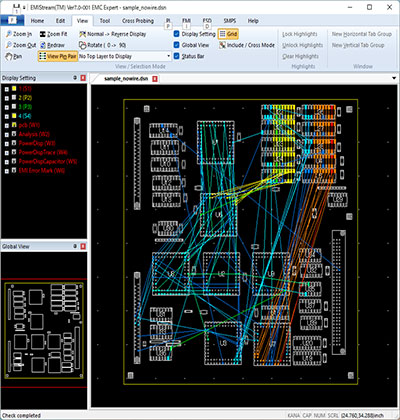
EMI Check Results (After Routing)
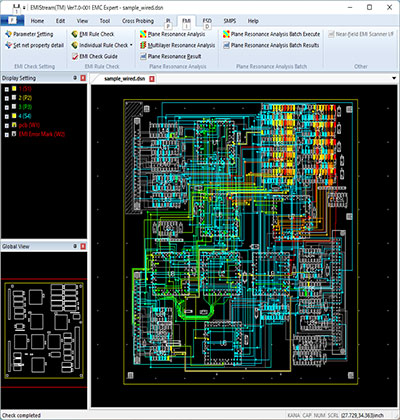
EMI Check Results (Before Routing)
EMI Rule Check: Check Items
NEC's EMI countermeasure technology is incorporated into the software.
- 1:Trace Length Check
- 2:Via Count Check
- 3:GV Plane Crossing Check
- 4:Return Path Discontinuity Check
- 5:Board Edge Check
- 6:Radiated Electric Field Check
- 7:SG Pattern Presence Check
- 8:SG Pattern Via Spacing Check
- 9:Plane Perimeter Check
- 10:Filter Check
- 11:Decoupling Capacitor Check
- 12:Differential Signal Check
- 13:Crosstalk Check
- 14:Digital-Analog Interference Check
- 15:LSI Ground Separation Check
AI-Powered Error Filtering
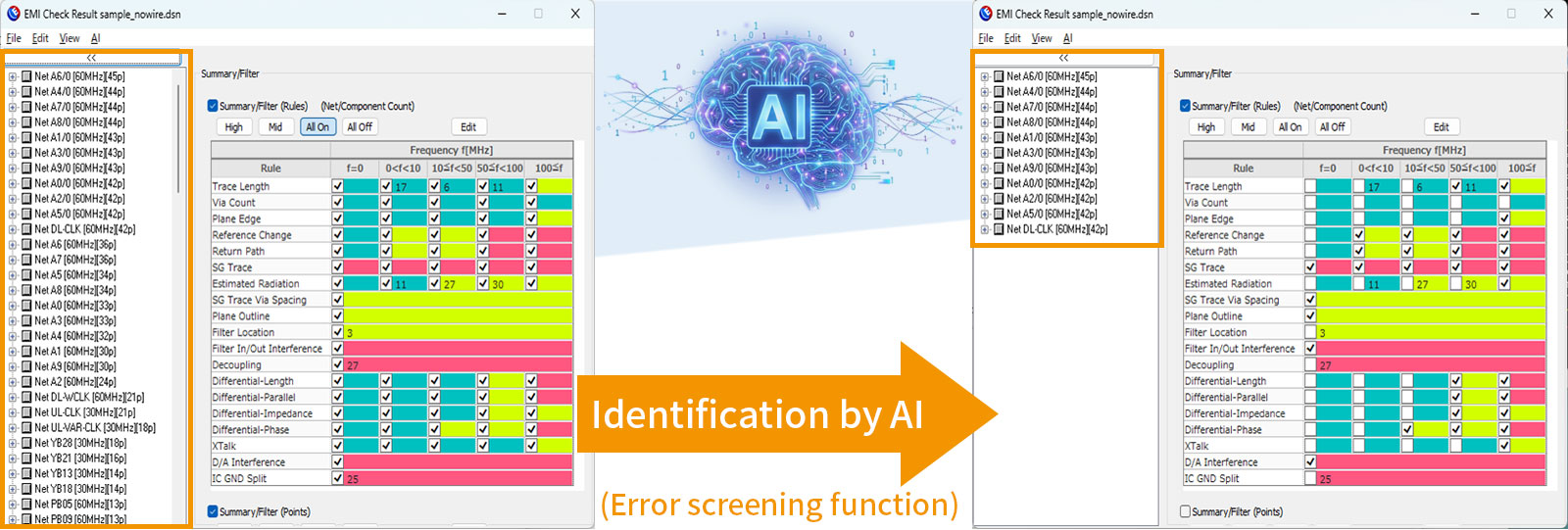
AI-Powered Error Filtering
AI models trained using deep learning and the expertise of EMC specialists help users focus on the issues that experts would prioritize when reviewing check results.
By narrowing down the results to the most significant errors, this feature helps reduce review time and improve design quality.
Two types of AI-powered filtering are available:
- ・Filtering Using NEC-Provided AI Models (Standard in Version 6): Uses AI models trained on NEC's expertise and EMC consultants' knowledge to provide versatile error filtering.
- ・Filtering Using User-Trained AI Models (Optional): Allows customers to create AI models trained on their own design expertise and product-specific design knowledge, enabling filtering tailored to individual products.
Using AI-powered filtering offers the following benefits:
- ・Reduces design review time through automatic filtering (the NEC-provided AI model reduces the number of errors by 75%).
- ・Reduces subjective judgments through consistent evaluation criteria, minimizing variations in design quality.
- ・Reduces the burden of user training and knowledge transfer.
EMI Check–Schematic Integration
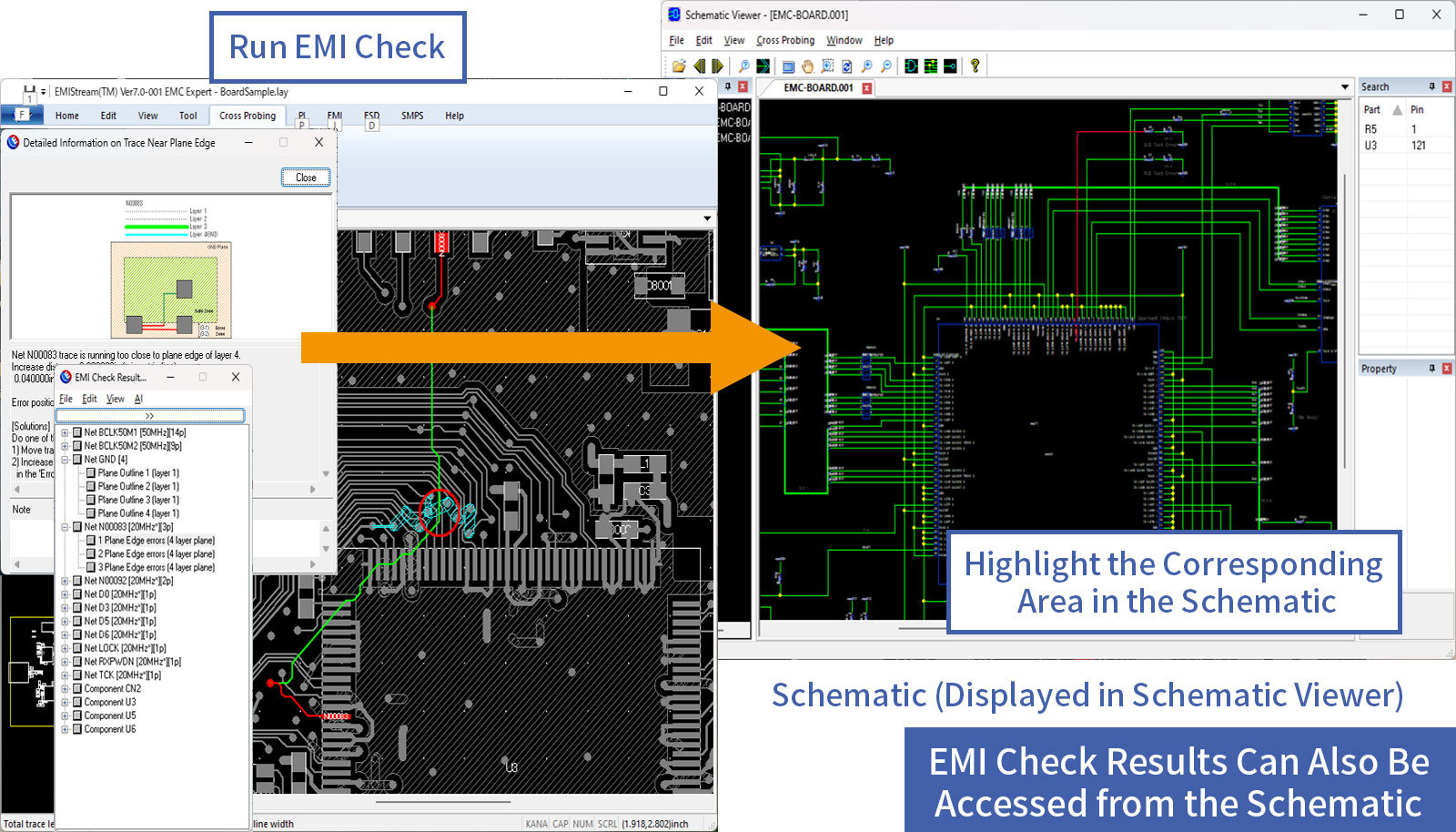
Integration of EMI Check Results with Schematics
Cross-probing between PCB layout and schematic diagrams links EMI check results with the corresponding schematic elements (nets, components, and pins), allowing users to search and highlight items in both directions.
When an error in the EMI check results is selected, the corresponding circuit is highlighted in the Schematic Viewer. This reduces the time required to review schematic diagrams and makes design reviews by circuit designers more effective.
Conversely, selecting a circuit in the Schematic Viewer locates the corresponding EMI check results. This makes it easy to identify errors associated with high-speed nets, such as clocks and buses, and critical ICs, such as FPGAs and microcontrollers.
Batch Execution of EMI Checks
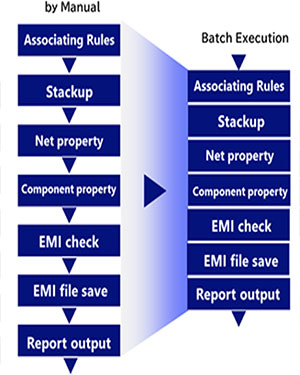
Batch Execution of EMI Checks
EMI checks can be executed from the command line.
Previously, running an EMI check required users to perform a series of operations one step at a time, as shown in the flow on the left.
With this feature, the entire EMI checking process can be executed in a single batch from the command line, as shown in the flow on the right.
Error Screening
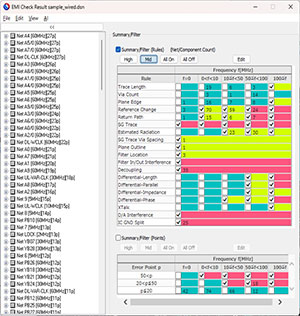
Error Screening
When an EMI check detects a large number of errors, correcting a few of them may not be enough to eliminate the remaining errors.
This feature identifies critical errors and nets containing numerous errors, highlighting those whose correction is likely to be most effective in reducing EMI. This makes it easy to narrow down the number of errors that need to be addressed.
EMI Check Reporting [Optional]
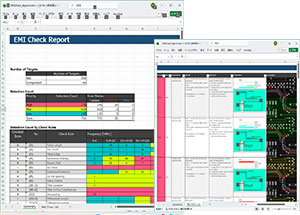
EMI Check Report
EMI check results can be exported as reports in Excel format.
The report consolidates rule execution status and detected errors by priority into a single list. Because the report is in Excel format, users can easily filter results and add or edit comments.
By adding information to or modifying the automatically generated report, users can significantly reduce the effort required to prepare reports and design change instructions.
- * This is an optional feature. It is included as standard in the EMIStream Expert Edition.
Detailed Analysis of Radiated Electric Field Checks [EMIStream Expert Edition]
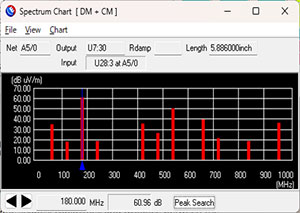
Detailed Analysis of Radiated Electric Field Checks
Radiated electric field checks estimate the EMI emission risk associated with each signal trace, taking into account the complexity of EMI phenomena. To simplify the analysis, parameters other than the minimum required information are assigned default values.
The Expert Edition allows users to adjust the rise time of each signal's voltage waveform and the damping resistance value, enabling calculations of radiation levels that more closely reflect actual conditions.
The results are displayed graphically, allowing users to identify potentially problematic frequency bands.
- * This feature is available only in the EMIStream Expert Edition.